Every OPERA 5 property has heard some version of “you have to migrate” from a vendor with something to sell. The truth is less dramatic and more useful: Oracle publishes exact support dates, the migration changes specific things about daily operations, and the hotels that struggle are usually the ones that treated it as an IT project rather than an operational one. This checklist covers what is actually documented, what changes, how data and interfaces move, what one of the largest OPERA 5 migrations taught its team, and how to keep guest communication running through the switch, with chatlyn’s OPERA 5 on-premise integration before cutover and the Oracle OPERA Cloud integration after it.
In short
- OPERA 5.6, the last on-premise release, has Premier Support until December 2027. There is no Extended Support and no published shut-off date.
- OPERA Cloud is Oracle-hosted software in the browser, updated by Oracle several times a year, with new features delivered switched off until you enable them.
- Interfaces move to OHIP, Oracle’s API platform, vendor by vendor. Some legacy interfaces, OXI among them, still run with OPERA Cloud.
- Data moves with Oracle’s migration utility or a fresh setup. Clean it first: it arrives exactly as it leaves.
- Guest communication can run without a break, because the same guest journeys work on both systems.
Where OPERA 5 support stands
The dates worth knowing come from Oracle’s own Applications Lifetime Support Policy, not from vendor slides. In the August 2026 edition:
| Release | Premier Support ends | Extended Support | After that |
|---|---|---|---|
| OPERA 5.6 | December 2027 (extended from April 2027) | Not available | Sustaining Support, indefinitely |
| OPERA 5.5 | October 2021 | Not available | Sustaining Support, indefinitely |
During the extension to December 2027, error correction applies only to OPERA 5.6.28 and later, so a property on an earlier 5.6 build has a reason to update even before it migrates. Release 5.5 left Premier Support in October 2021, a transition Oracle partner Mastel Hospitality documented for its customers at the time.
Two nuances matter. First, there is no published shut-off date: after Premier Support ends, OPERA 5 enters Sustaining Support indefinitely, which means the software keeps running but new fixes, updates and certifications stop. Second, Oracle has extended the 5.6 date before, so check the current policy document for your version rather than relying on any article, this one included. The operational question is not “when does OPERA 5 die” but “how long do we want to run the front office on a system that no longer receives fixes”.
OPERA 5 and OPERA Cloud side by side
OPERA Cloud is not OPERA 5 in a browser; it is a different system with the same vocabulary. The table sums up what Oracle’s own documentation says about each.
| OPERA 5 | OPERA Cloud | |
|---|---|---|
| Where it runs | Your servers (Windows Server, Oracle Database), or Oracle’s “OPERA 5 Hosted” option | Oracle-hosted, multi-tenant software on Oracle Cloud Infrastructure |
| How staff open it | Windows workstations with a configured browser and Java | Any supported browser (Chrome, Edge, Firefox, Safari), with tablet check-in and check-out |
| Updates | Upgrade projects you plan and run | Delivered by Oracle several times a year (releases 26.1 to 26.4 in 2026); many new features arrive switched off until you enable them |
| Commercial model | Licence with Oracle support | Subscription, priced per guest room |
| Interfaces | OXI, IFC8 and other point-to-point interfaces | OHIP REST APIs and business events; some legacy interfaces still supported |
| Payments | Oracle Payment Interface (OPI), on-premise | OPI, including OPI Cloud, connecting cloud to cloud with payment providers |
| Reports | OPERA 5 reports, often heavily customised | Standard OPERA Cloud reports, plus Reporting and Analytics (a separately ordered service) for custom reports |
| Several hotels | Configured per installation | Configuration at chain or property level, multi-property reports from a hub |
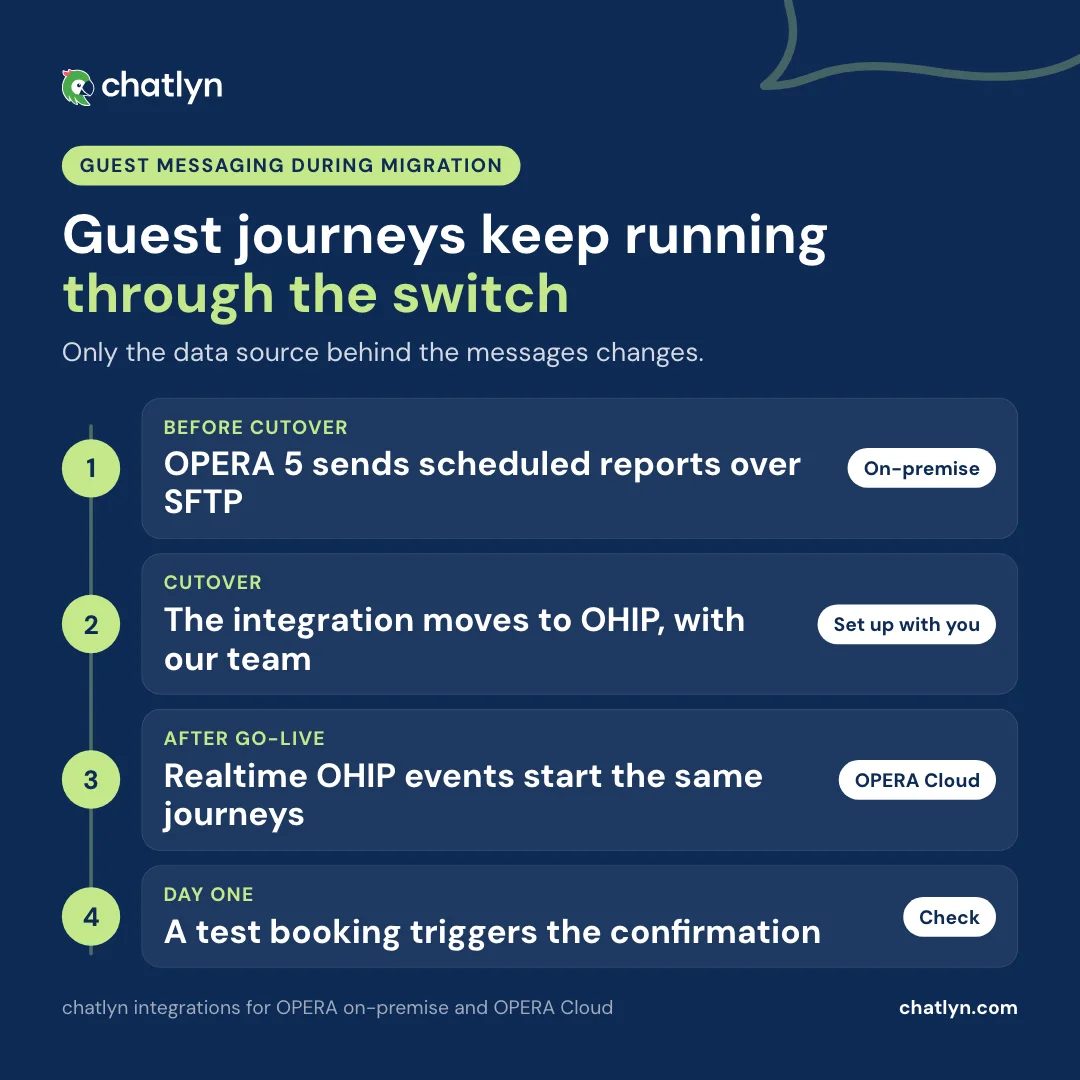
For guests, none of this should be visible. The same guest journeys can run on both systems, so only the data source behind the messages changes:
What migration changes day to day
Teams report that familiar workflows change shape, screens are organised differently, and some tasks take more clicks than muscle memory expects, which makes retraining a real workstream rather than a formality. Three areas deserve their own owner.
Reports. Standard OPERA Cloud reports can be copied with preset parameters, scheduled, and run for several properties from a hub, but Oracle’s documentation is clear that they do not output custom flex fields and do not support localisation. Custom reporting lives in Reporting and Analytics, which is ordered separately. Teams that lived in custom OPERA 5 reports should list the reports they really use and prototype each one before cutover.
Payments. OPERA Cloud takes payments through the Oracle Payment Interface. OPI Cloud connects cloud to cloud with your payment provider and adds options such as Pay By Link and tokenisation. Hotels do not always switch everything at once: Rotana ran OPERA Cloud with on-premise OPI first, then moved 21 hotels in the UAE to OPI Cloud after a pilot property, according to its payment provider’s case study. Confirm early that your provider is certified for your target setup and how stored card tokens move.
Updates. Instead of upgrade projects every few years, OPERA Cloud changes several times a year. Many new features are delivered switched off, so somebody has to read Oracle’s release readiness guides and decide what to switch on. That role did not exist on OPERA 5.
How your data moves to OPERA Cloud
Oracle offers an official utility, OPERA to Cloud Migration. The property runs a small component on its database server that sets up a secure file transfer and produces an evaluation report; Oracle’s migration team then runs an initial data transfer, and later a final one right before go-live. The request is opened through Oracle sales, and the utility supports OPERA versions from 5.0.03.03.
Oracle Consulting has described two paths. A full migration carries over data, history, reservations and configuration, but needs clean data and a test migration first, and can mean significant downtime. A new installation starts clean, imports the configuration and brings reservations and profiles across through a third party, with downtime limited to the cutover itself. Third-party tools exist for that second path; one moves profiles, reservations, rate codes, packages and financials over OXI, and still needs code mapping wherever values do not match one to one.
Either way, the rule from practitioners holds: dirty data migrates as dirty data. Duplicate guest profiles, inconsistent rate codes and old routing rules arrive intact and then undermine reporting and front-desk work in the new system. Clean before the first transfer, not after go-live.
Interfaces: what moves to OHIP and what still runs
On OPERA Cloud, new integrations use OHIP, Oracle’s API platform. Outbound data flows as business events, which a connected system receives by streaming or by polling, and Oracle recommends streaming. Inbound data uses OHIP’s REST APIs.
Two details shape every interface plan:
- Codes must match one to one. OXI let you map OPERA codes to another system’s codes, such as room types, rate codes and packages. Oracle’s OHIP documentation says the REST APIs no longer follow this approach: codes must be one to one, or the other system has to handle the mapping on its side. That is rework per vendor, and it belongs on the plan from day one.
- Legacy interfaces have not disappeared. OPERA Cloud still supports OXI, OEDS, OFIS and FIAS property interfaces, each with its own interface service account, and property-level interfaces run through a software agent on hardware at your site. Oracle also notes a few IFC8 operations that are not yet available in REST, and membership functions from OPERA Web Services that are not yet in REST. Ask each vendor which route they will use, OHIP or legacy, and when.
The most useful document in the whole project is a simple interface inventory. A starting point:
| System | Today on OPERA 5 | On OPERA Cloud | Vendor contact | Status |
|---|---|---|---|---|
| Booking engine | OHIP or legacy | |||
| Channel manager | ||||
| Door locks | ||||
| Point of sale | ||||
| Payments | OPI or OPI Cloud | |||
| Revenue management | ||||
| Guest messaging | chatlyn via SFTP reports | chatlyn via OHIP | chatlyn customer success |
If OHIP is new territory, our plain-language guide what is OHIP? covers what the platform does and what connecting a vendor involves.
Big bang or phased: what Thon Hotels learned
The best documented OPERA 5 migration is Thon Hotels in Norway. According to Oracle’s own write-up, Thon moved 96 hotels from on-premise OPERA 5 to OPERA Cloud in 31 hours, going live on 8 April 2024. Oracle Consulting had recommended the standard phased approach; Thon chose a “big bang” to avoid running two master databases side by side, and Oracle now describes the big bang as a standard delivery option.
What made it work:
- A project group about six months ahead, with standardisation across hotels done first.
- Training finished three weeks before go-live, on Oracle’s learning platform, with superusers named at every hotel.
- A rehearsed fallback. In the final week, every hotel practised recording check-ins and housekeeping in spreadsheets for the hours, and potentially days, of downtime.
- Pilots first. Command centres ran the switch: five pilot hotels went first and tested interfaces and card transactions, then groups of ten followed.
- No parallel running. About 2,000 OPERA 5 users were closed out on the morning of go-live, and staff worked in OPERA Cloud the next day.
Large groups have moved fast in other ways too. Motel One brought more than 100 hotels in 13 countries onto OPERA Cloud in about four months, averaging 14 go-lives a week, moving its operational and financial records, guest and ledger balances, and room and housekeeping status. PPHE Hotel Group, a long-standing OPERA 5 user, announced its move to OPERA Cloud for 18 properties and 5,200 rooms in November 2025.
Keeping guest communication running
Guest communication is one of the few systems that can stay continuous through the whole migration, because chatlyn supports both sides of it. On OPERA 5, the Oracle OPERA on-premise integration runs guest journeys from scheduled reports over a secured SFTP connection. On OPERA Cloud, the Oracle OPERA Cloud integration subscribes to realtime events through OHIP. A property switches from one to the other during cutover, with our customer success team, and the guest-facing journeys, confirmations, pre-arrival messages, AI answers on WhatsApp, webchat, Facebook Messenger, Instagram and newly created Booking.com inboxes, carry on unchanged.

For mixed estates, the same dual support means a group can migrate property by property while every hotel keeps messaging guests. And a few habits make cutover weekend calmer on the guest side:
- Keep the inbox staffed. If check-in pauses while systems switch, guests write. The AI answers routine questions from your own knowledge, and a named person picks up everything else.
- Pause campaigns, not journeys. Confirmations and pre-arrival messages should keep going out; marketing sends can wait a week.
- Tell the AI what is happening. A short note in your knowledge about longer check-in times that weekend lets it answer honestly.
- Test on day one. Make a test booking in OPERA Cloud and check that the confirmation arrives within moments.
Pitfalls hotels actually report
Recurring lessons from practitioners, consultants and published migrations:
- Dirty data migrates as dirty data. Years of inconsistent OPERA 5 use, duplicate guest profiles above all, arrive intact in OPERA Cloud unless cleaned first.
- The slowest vendor sets the pace. Each interface needs an OHIP or legacy route and aligned codes, and one late vendor can hold back go-live.
- Reports need rebuilding. Custom OPERA 5 reports do not carry across by themselves; prototype the important ones in OPERA Cloud or Reporting and Analytics before cutover.
- Training is bigger than expected. Reviewers report changed workflows and more clicks for routine tasks; the properties that fare best finish training before go-live and keep a superuser per shift.
- Cutover pauses operations. Check-in, payments and housekeeping updates can pause during the switch, so plan the window for low occupancy and rehearse the manual fallback.
- Nobody owns the release notes. After go-live, features arrive switched off several times a year. Without an owner, the hotel never benefits from them.
None of these argue against migrating. They argue for treating the migration as an operational programme with an owner, a data cleanup phase and a vendor-by-vendor interface plan.
Cutover week, step by step

An example sequence, based on Oracle’s migration utility and Thon’s documented go-live:
- Final week: freeze configuration changes, rehearse the manual fallback for check-in and housekeeping, confirm every vendor’s go-live steps.
- Day before: final checks on interfaces and card transactions in the test environment; brief every shift; staff the guest inbox.
- Cutover: final data transfer, close out OPERA 5 users, switch interfaces, including guest messaging, to their OPERA Cloud routes.
- First hours: pilot transactions end to end: a reservation, a check-in, a card payment, a confirmation message to a test guest.
- First two weeks: a daily check-in with superusers and vendors, a list of open issues, and a quick look at reports against the old system.
The checklist
Before you start
- Confirm your OPERA 5 version and its support dates against Oracle’s current lifetime support policy, and update to 5.6.28 or later if you are earlier.
- Choose your path: full migration with history, or a new installation with selected data.
- Name an owner for the programme and a superuser per department.
Data and interfaces
- Clean the data before the first transfer: guest profiles, rate codes, routing rules.
- Build the interface inventory, with each vendor’s route (OHIP or legacy), code alignment and go-live date.
- Confirm your payment provider’s certification and how card tokens move.
- Prototype your most-used reports in OPERA Cloud or Reporting and Analytics.
People and go-live
- Finish training before go-live, with time to practise.
- Schedule cutover for low occupancy, with a rehearsed manual fallback.
- Plan guest communication for cutover weekend: journeys on, campaigns paused, inbox staffed.
- After go-live, verify the OHIP event flow end to end: a test booking should trigger the confirmation message within moments.
- Name someone to read each OPERA Cloud release and decide which new features to switch on.
Frequently asked questions
Is OPERA 5 end of life? Oracle publishes no shut-off date. The last supported release, 5.6, has Premier Support until December 2027 per Oracle’s current lifetime support policy, with no Extended Support tier; after that it runs on indefinite Sustaining Support, without new fixes or certifications. Check the policy for your exact version.
How long does an OPERA 5 to OPERA Cloud migration take? It depends far more on preparation than on the switch itself. Thon Hotels formed its project group about six months ahead and then moved 96 hotels in a single 31-hour cutover; Motel One brought more than 100 hotels onto OPERA Cloud in about four months. Data cleanup, interface readiness and training are usually what sets the date.
Do we lose our integrations when we migrate? Each interface needs a route on OPERA Cloud: OHIP’s REST APIs and business events, or one of the legacy interfaces OPERA Cloud still supports, such as OXI. Codes must match one to one on the REST APIs, so each vendor needs a plan. chatlyn supports both sides: SFTP-based journeys on OPERA 5 today and realtime OHIP events on OPERA Cloud after, so guest communication continues through the switch.
Is OXI still available with OPERA Cloud? Yes, as a legacy interface. OPERA Cloud’s documentation lists OXI, OEDS, OFIS and FIAS property interfaces, each with its own interface service account. Oracle’s direction for new integrations is OHIP.
What happens to our custom OPERA 5 reports? Plan to rebuild them. Standard OPERA Cloud reports cover daily operations, and custom reporting lives in Oracle’s Reporting and Analytics, a separately ordered service. List the reports your team really uses and prototype them before cutover.
Do we have to change our payment interface? OPERA Cloud takes payments through the Oracle Payment Interface, including OPI Cloud. Whether your current setup changes depends on your payment provider, so confirm its certification and how stored card tokens move early in the project.
Big bang or phased migration? Both work. Oracle Consulting traditionally recommended a phased rollout; Thon Hotels chose a big bang to avoid two master databases, and Oracle now offers it as a standard option. Phased rollouts suit groups that want to learn from a pilot property first.
Can guest messaging keep running during the cutover? Yes. The journeys run on the on-premise integration until cutover and on OHIP after; the AI keeps answering guests on WhatsApp, webchat, Facebook Messenger, Instagram and newly created Booking.com inboxes throughout, and only the data source behind the journeys changes.
Sources
- Oracle Applications Lifetime Support Policy (August 2026 edition)
- Mastel Hospitality: OPERA 5.5 support policy update
- Oracle OHIP documentation: migrating from legacy APIs to REST and OPERA Xchange Interface (OXI)
- Oracle OHIP documentation: property interfaces (IFC8, FIAS) and business events
- Oracle OPERA Cloud 26.4 documentation: reports, interface users and release readiness
- Oracle Hospitality Cloud Services: service descriptions and metrics
- Oracle OPERA to Cloud Migration: customer guide and Oracle Consulting: journey to OPERA Cloud
- Oracle Payment Interface Cloud documentation and Planet: Rotana Hotels case study
- Oracle: Thon Hotels’ big bang migration to OPERA Cloud
- Lodging: Motel One powers 100+ properties with OPERA Cloud and Oracle: PPHE Hotel Group implements OPERA Cloud
- Beyond: OPERA Cloud data migration lessons
- Practitioner reviews on Capterra and Hotel Tech Report